

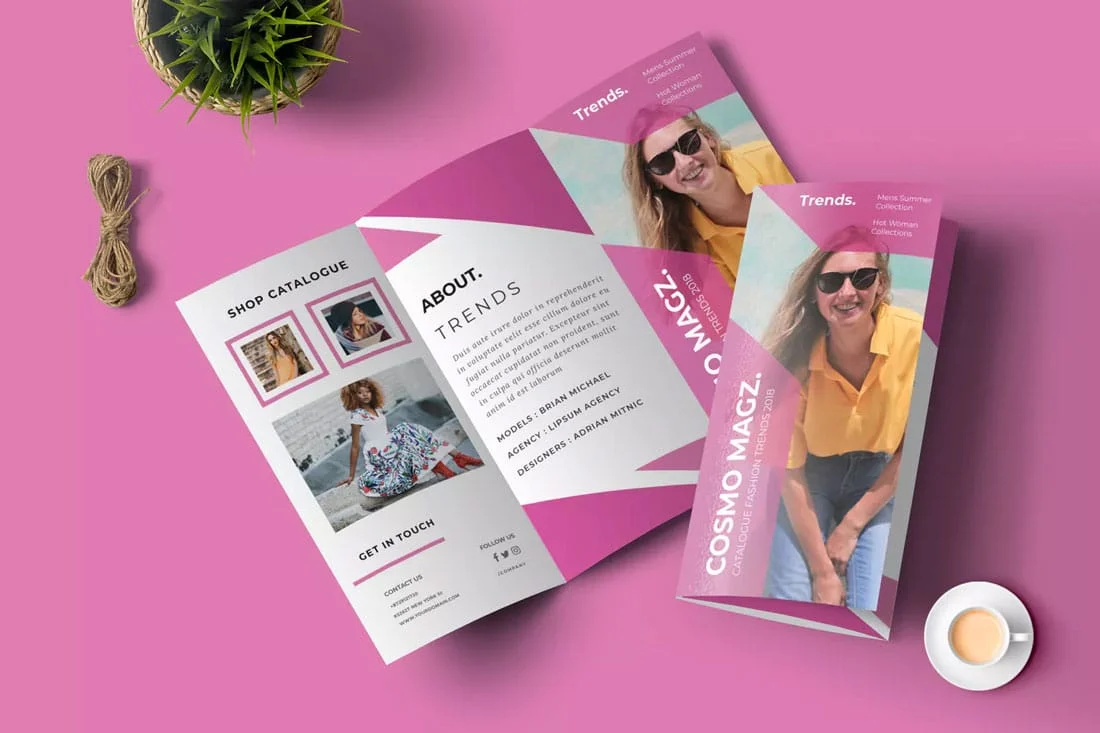
Creating a brochure is a powerful way to communicate your message, whether for a business, an event, or a personal project. If you’ve been asking yourself how to make a brochure that captures attention and conveys information effectively, you’ve come to the right place. In this guide, we’ll walk you through the entire process of how to create a brochure from scratch, whether you’re designing it by hand or crafting one digitally online. Let’s get started!
What Is a Brochure and Why You Need One
A brochure is a printed or digital marketing material that provides concise information about your business, products, or services. It’s an essential tool for businesses and individuals alike. Whether you’re working on how to make a business brochure, a company brochure, or a simple brochure, knowing how to make it visually appealing and informative is key.
 Choosing the Right Colors for Your Brand
How to Make a Brochure: A Step-by-Step Guide
1. Determine the Purpose of Your Brochure
Before diving into the brochure design, think about the objective. Are you promoting a service? Providing information about a product? Or perhaps advertising an event? Knowing what you want to convey will guide your layout, content, and style. Whether you’re creating a business brochure or a company brochure, it’s essential to define the purpose upfront.
2. Choose the Right Format
When it comes to how to make a brochure, the format is crucial. Brochures come in various sizes and folds:
- Bi-Fold: A simple, two-panel brochure, ideal for short and straightforward messages.
- Tri-Fold: A more complex layout with three panels, giving you more space for information and visuals.
- Z-Fold or Accordion: Offers multiple panels that expand out, perfect for extensive details.
3. How to Make a Brochure from Scratch
If you prefer hands-on creation, you might choose to make a paper brochure. For this, you’ll need:
- High-quality paper: Use a thick paper stock to give your brochure a professional feel.
- Print materials: Ensure your printer or print shop can handle the design and colors you want to use.
You can also create your brochure by hand using design software, or even a simple online tool. If you’re crafting a company brochure or business brochure, digital tools may be easier and more customizable.
4. Design Your Brochure
Once you’ve decided how to make a brochure and have chosen your format, the next step is brochure design. Your brochure should have a clean, easy-to-read layout with these key components:
- Headline: Capture attention immediately with a strong headline that tells the reader what the brochure is about.
- Body Text: Keep your message clear and concise. Break the text into digestible chunks.
- Images/Graphics: Use high-quality images or illustrations that support your message and make the brochure more engaging.
- Call to Action (CTA): Don’t forget to include a clear CTA, whether it’s directing people to a website, encouraging them to call, or inviting them to an event.
Incorporating your brand’s color scheme and fonts will also make your brochure feel cohesive with your other marketing materials.
How to Design a Logo for Your Business
5. How to Make a Brochure Online
If you’re wondering how to create an online brochure or a digital version, there are several online tools that make it easy:
- Canva: A user-friendly platform that offers pre-designed templates for easy brochure creation.
- Adobe Spark: Another great online tool for making a brochure design quickly.
- Microsoft Publisher: Ideal for those who prefer a traditional desktop application.
These platforms allow you to design and format a brochure with drag-and-drop simplicity, plus the option to download or print your brochure once it’s ready.
6. How to Format a Brochure for Printing or Sharing Online
When you’re ready to print your brochure, it’s important to format it correctly to ensure high-quality results. If you’re creating a paper brochure, check the following:
- Resolution: Make sure images are at least 300 DPI (dots per inch) for printing.
- Bleed and Margin: Leave a margin of at least 0.25 inches and ensure any background images extend beyond the edges to avoid white borders.
For online brochures, file size and optimization are key for fast loading times, especially if your brochure includes images or interactive elements.
7. How to Layout a Brochure
A great brochure layout is more than just visually appealing – it must be functional. Here are some tips for a well-balanced brochure layout:
- Hierarchy: Start with the most important information at the top. People should be able to quickly skim your brochure and find what they need.
- Spacing: Leave enough white space to make the brochure easy to read. Don’t overcrowd the page with too much text or too many images.
- Consistency: Stick to a consistent design for each panel of the brochure, so the overall feel is harmonious.
8. How to Write a Brochure
Now comes the important part: writing. Whether you’re writing a brochure for a business, or an informational brochure, your writing should be clear, persuasive, and to the point. Here are some tips for writing your brochure:
- Engage the reader with a catchy introduction.
- Be concise—you don’t have a lot of space, so use short, compelling sentences.
- Highlight the benefits of your product, service, or event, and explain why it’s valuable.
If you’re creating a business brochure or company brochure, include specific details about your offerings, and be sure to include all necessary contact information.
9. How to Make Your Own Brochure
While it’s tempting to hire a professional, creating your own brochure can be cost-effective and fulfilling. With the right tools and a bit of creativity, you can design a stunning brochure that will resonate with your audience.
10 Tips for Effective Graphic Design
Final Thoughts on How to Make a Brochure
Whether you’re making a simple brochure, a business brochure, or a more elaborate company brochure, the key is to focus on clear, engaging content paired with effective design. Follow this step-by-step guide, and you’ll be able to create a brochure that looks professional and achieves your goals.
If you’re wondering how to make a brochure online, or if you need advice on the best design tools, we’ve got you covered. Creating brochures has never been easier, and with the tips provided, you’re ready to start your project today!
FAQ`s
1. What is the easiest way to make a brochure?
The easiest way to make a brochure is by using online design tools like Canva or Adobe Spark. These platforms offer pre-made templates, making it simple to create a professional brochure without any design experience. Just customize the template with your content, images, and branding, and you’re good to go!
2. Do I need graphic design skills to make a brochure?
While graphic design skills can help, you don’t need them to create a brochure. Many online tools, like Canva and Microsoft Publisher, offer easy-to-use templates that guide you through the design process. These tools allow you to focus on your content while the software handles the design aspect.
3. How do I choose the right format for my brochure?
The format of your brochure depends on how much information you need to include. For a simple message, a bi-fold brochure (two panels) may suffice. If you have more information or want to include more visuals, a tri-fold brochure or Z-fold (multiple panels) may be better. Consider your message and audience to select the format that works best for your needs.
4. Can I create a brochure online for free?
Yes, many online tools like Canva, Adobe Spark, and Microsoft Publisher offer free versions with brochure templates. These tools allow you to design and download your brochure without any cost, although some premium features may require a subscription or one-time payment.
5. What should I include in the content of my brochure?
Your brochure should include key information about your product, service, or event, presented clearly and concisely. Start with an engaging headline, followed by a brief description or benefits. Don’t forget to include contact details and a strong call to action (CTA), such as “Call now,” “Visit our website,” or “Sign up today.”